Google’s new intelligent Search box and It’s impact on SEO
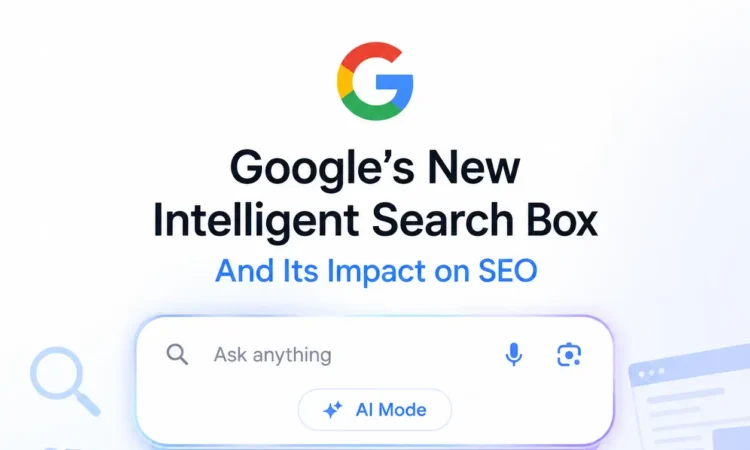
Google’s I/O 2026 introduced a radically new “intelligent Search box” that transforms Search into an AI-driven interface. The box accommodates longer, conversational queries (including text, images, files, videos, and open browser tabs) and offers AI-powered suggestions beyond standard autocomplete. Under the hood, Google uses its latest Gemini 3.5 Flash model and Antigravity platform to generate dynamic answers: interactive visualizations, charts, and “mini-apps” that run on-the-fly for users’ questions. These AI Overviews and dashboards appear directly in Search results, often ahead of or instead of traditional blue links.
Early data and expert analyses indicate this will significantly affect SEO: Click-through rates on organic results drop as AI answers occupy more real estate. To adapt, site owners must optimize for Google’s new AI interface: use structured data to define entities and relationships, ensure content can be cited in AI answers, and monitor Search Console’s new AI modes. We survey the announced features, technical workings, ranking impacts, and actionable SEO recommendations in detail below.
Table of Contents
1. Search Box Features and UI Changes
Google calls the new search interface the “intelligent Search box” – the biggest upgrade in 25 years. It expands as users type, encouraging much longer, more conversational queries. The box now supports multimodal inputs: users can paste or upload text, images, files, videos, or even search among open Chrome tabs. An AI-powered suggestion system offers context-aware prompts (far beyond standard autocomplete) to help refine queries.
The UI seamlessly links to a new “AI Mode” (chat-like interface), accessible on desktop and mobile. In results, Search may display AI Overviews: rich answer blocks or interactive elements (charts, simulations, mini-apps) generated by Gemini and Antigravity. These visuals are tailored to each query – for example, diagrams explaining astrophysics or custom fitness-tracker dashboards. The result page can “wrap” the search box into a larger AI workspace, changing how users view answers. In sum, the Search UI shifts from a static list of links to a dynamic AI canvas.
2. Answer Generation and Technical Architecture
The intelligent box leverages Google’s advanced AI models and cloud infrastructure. Queries entered are sent to Gemini 3.5 Flash, a new, efficient multimodal model. In practice, the browser may run a lightweight Gemini Nano model for immediate response, while heavy lifting (composing visuals, complex queries) is done server-side with Gemini 3.5 Flash and Antigravity agents.
Google’s Agentic Coding tech lets Search autonomously “code” answers: it can fetch data (via the Model Context Protocol) from real-time sources like reviews, live maps, and weather, then assemble charts or mini-app interfaces on the fly. In essence, Google’s servers (often on Google Cloud TPU clusters) translate the query into structured plans, fetch relevant data/APIs, and generate HTML/CSS/JavaScript widgets that render in your results.
This process is dynamic – an answer might update continuously (e.g., a stock tracker). Crucially, all search results remain privacy-safe: Google says this feature is “Personal Intelligence,” separately for connected apps (email, calendar), with user permission. The exact ranking algorithms remain undisclosed, but Google emphasizes that responses blend generative answers with links. We assume link-based ranking still influences which sites are used as sources, but AI answers may synthesise multiple sources directly.
3. SEO Implications: Rankings, CTR, Traffic
The shift to AI-driven results has immediate SEO consequences. With AI Overviews occupying prime SERP real estate, organic clicks drop dramatically. Industry analysis finds that appearance in an AI Overview yields many impressions but low click-through (CTRs can fall 15–89% compared to traditional search). Google itself notes that users will “spend even less time clicking traditional blue links”. If a direct AI answer is shown, fewer users click through to websites. This redistributes traffic: more impressions but fewer visits. Organic ranking signals likely still matter (Google needs to decide credible sources for answers), but their visibility is reduced.
Moreover, searchers may increasingly stay within Google: AI-generated mini-apps may let users take actions (e.g., add items to cart, track tasks) without visiting publisher sites. Early SEO commentary warns that “fewer clicks to your website” are inevitable. To measure this change, Google has updated Search Console with separate segments: “AI Overviews” and “AI Mode”. Site owners can now track impressions and clicks from AI results distinctly. Key metrics to watch include AI Overview impressions, AI CTR, and citation frequency in answers. Traditional rank and click stats alone can be misleading; a site may get more visibility (impressions) but less traffic.
SEO ranking factors may also evolve. We do not know if Google directly boosts content flagged as high-quality by AI metrics, but it’s plausible that sites cited in AI answers gain authority. Conversely, sites that rely solely on short-tail queries might see less traffic. In summary, SEO value shifts towards being an authoritative source of data (for AI to cite) rather than just ranking for keywords.
4. Content and Technical SEO Changes
Publishers should optimise content and site infrastructure for the new AI era. Key tactics include:
- Structured Data & Entity Markup: Use schema to define entities, attributes, and relationships on the page. For AI to extract facts (e.g., product details, event info, how-to steps), markup ensures clarity. Think of your page as a “knowledge graph”: mark up authorship, dates, products, pricing, etc. AI needs stable identifiers (@id) so it can treat your content as facts.
- Content Clarity: Write concise, well-organised content. AI Overviews often draw from Q&A or list formats. Using clear headings, bullet points, and answer-focused sections helps Google summarise your content. FAQs, how-to guides, and definitions are likely sources for direct answers.
- Performance and Accessibility: The new interface prioritises rich components and speedy UX. Ensure pages load quickly and are mobile-friendly. Use lightweight interactive elements (Google’s mini-apps likely reuse Angular/React components); offload heavy work to the client. Also, since visual results may extract on-screen content, use proper alt text for images and ARIA labels for widgets.
- Interactive Components: Consider exposing data via API endpoints or web components. If Google’s search box is running mini-apps that pull in fresh data (like stock prices), publishers can provide JSON or API access. Although Google hasn’t detailed APIs here, being able to serve real-time data (e.g., via schema-backed JSON-LD or a public API) may improve a site’s appearance in dynamic answers.
- Canonical Answers: For complex queries, Google might synthesize from multiple pages. Ensure each answer is authoritative. Using a speakable schema or QAPage markup can signal important quotes or summaries. Embedding answers as structured text (e.g., summary paragraphs with schema.org/Answer) might help.
- Security and Privacy: The intelligent box can query across sites. Publishers must maintain secure HTTPS and clearly visible privacy policies to be trusted data sources. Avoid any spammy redirects or interstitials that could confuse AI crawlers.
In short, follow core SEO best practices (structured data, fast & accessible sites) with extra emphasis on making your content easily “understandable” to AI.
5. Publisher and Developer Integration
While there is no “AI plugin” for Search yet, Google offers related developer tools:
- Structured Data and Schema: As above, ensure your site uses Schema.org markup. Google’s docs confirm structured data helps AI systems extract entities.
- Google Search Console: Already supports tracking for AI Overviews and AI Mode. Publishers should use this to see how often their content is cited in AI answers. The Console filter distinguishes AI impressions and clicks.
- Antigravity/Gemini CLI: These are developer tools for AI coding, not directly for SEO. However, they could help tech teams prototype how to present data or visualize search features. For instance, Antigravity agents could scrape one’s site and simulate how AI might transform the content.
- APIs: Google has not announced a public “Search AI” API for publishers. Traditional search APIs (Custom Search JSON, Indexing API) may be complemented in the future with AI-oriented endpoints. If Google releases an API to feed or retrieve AI answers, SEO teams should adopt it.
- Verification/Trust: Google may still reward verified knowledge. Keep Google business and site verifications up-to-date. Participate in Google News or publisher programs to signal credibility.
- Emerging Schema: Watch for new schema types. Google mentioned “Science Skills” on GitHub (for Gemini). If Google introduces new structured formats (for mini apps), update accordingly.
- Plugins: No SEO plugin directly for agentic search is known. But CMS and SEO tool plugins will likely emerge (e.g., WordPress schema plugins, AI-content validators).
In summary, integration is mostly about data formatting (schema) and using Google’s analytics tools rather than direct API integration at this stage.
6. Analytics and Measurement
Google now treats AI results as distinct search types. Search Console has “AI Overviews” and “AI Mode” filters. SEOs should:
- Enable AI-specific filters in Performance reports: separate AI and Web search data. This shows impressions and clicks for AI answers vs traditional results.
- Monitor AI Overview Impressions (how often your site’s content is cited by AI blocks) and AI CTR (clicks on AI-driven answers). A spike in impressions with low clicks indicates content being used as a source.
- Compare AI Mode queries (longer, conversational queries) against regular traffic to understand which content resonates in chat-like interfaces.
- Use custom reports or BigQuery exports to segment traffic by search type over time. This reveals trends like “impression share in AI vs organic”.
- Note conversion tracking: if users are finding answers via AI, traditional web analytics might show lower referral sessions. Tie conversions not just to clicks but to Assisted metrics (e.g., view-through).
- Outside Google, track brand SEO visibility. Fewer “top-10” visits might still come from high-intent AI-driven queries.
- For tactical content A/B tests, compare performance in AI vs web search segments.
In effect, SEOs must treat AI results as a new channel: measure them and factor them into ROI. Google’s transparency here (dedicated metrics) is crucial.
7. Privacy, Compliance, and Brand Safety
Agentic Search raises concerns. AI answers may cite content out of context or hallucinate. Publishers should:
- Opt-out Sensitive Content: Mark content that shouldn’t appear in AI answers (e.g., medical/legal advice) as appropriate. Use noindex or disallow in robots.txt if needed.
- Privacy-Preserving Queries: Users may query personal data. Google’s new Personal Intelligence lets users safely connect to apps (with consent). Ensure any user-specific feeds respect privacy.
- Copyright and Attribution: AI answers might extract content without attribution. Ensure your licensing and copyright info is clear; use schema:copyrightHolder if relevant.
- Brand Safety: Monitor citations of your brand in AI responses. If misinformation arises, use Google’s feedback/reporting tools to request fixes.
- Legal Compliance: Be aware of new regulations on AI content. If national laws require data to stay local, or forbid certain automated use, ensure compliance (Google may segment Search outputs by region).
Google itself will incorporate safety filters (e.g., avoiding violent/explicit answers). Publishers should align with Google’s content policies. If your site is in E-A-T (Expertise, Authoritativeness, Trustworthiness) categories, demonstrate provenance (author bio, credentials) clearly.
8. Competitive Context and Timeline
Competitors: Microsoft’s Bing has already integrated OpenAI’s GPT into search and offers a chat experience. Bing shows AI answers (with source links) for queries. Bing’s SEO impact is similar: sites report lower clicks when answers are shown. However, Bing’s usage is smaller than Google’s. Other players (e.g., DuckDuckGo’s GPT-powered “Instant Answers”, chatbots like ChatGPT) are tangential competitors. For now, Google’s deep integration (on 90%+ of queries) makes its launch far more impactful than Bing’s.
Timeline: Google states AI Overviews and generative UI begin rolling out this summer 2026 for all users. Information Agents and mini-app dashboards start with US AI Pro/Ultra subscribers soon, then expand globally. Structured rollouts:
- Summer 2026: New search box UI and generative answer features go live for everyone.
- Late 2026: AI tracking in Search Console is fully available, and agentic dashboards reach more users.
- Competitors will react: Bing and others may accelerate their own features. But Google’s advantage is scale and the Gemini model performance (Pichai notes Gemini 3.5 is cheaper/faster than rivals).
Early indicators show most of Search traffic (now >50% of queries trigger AI Overviews), so full adoption is rapid. SEOs should assume this is the new normal for 2026 and beyond.
9. Recommended SEO Strategy and Checklist
- Short Term (0–3 months):
- Audit content for clear schema markup (use [74†L480-L488] guidelines): implement Article, FAQPage, HowTo, Product, etc. Ensure all key data (price, ratings, author, dates) is marked up.
- Monitor Search Console’s new AI filters. Identify high-impression, low-CTR pages in AI Overviews – these may need more engaging content or calls-to-action.
- Test content for “AI readability”: break text into answers. Use bullet points and tables to facilitate extraction.
- Improve page speed and mobile UX (AI Overviews display instant results; slow sites may be bypassed).
- Medium Term (3–12 months):
- Develop “AI-friendly” content (e.g., Q&A sections, interactive demos) that can be directly used in answers.
- Leverage rich snippets: implement “Speakable” and “WebPage” schema if applicable (so answers can source audio snippets or facts).
- Explore partnerships or APIs: if your data is used (e.g., weather, flights), consider providing API access.
- Update internal linking to guide Google’s AI agents through key pages. Ensure site search and knowledge graph (via internal sameAs links) are accurate.
- Long Term (beyond 12 months):
- Invest in brand and expertise signals. AI-driven search may favour trusted sources. Get authoritative content that can serve as “facts” in answers.
- Expand content into formats that AI tools can reuse (videos with transcripts, voice answers, AR/VR if “glasses” use-case grows).
- Continuously analyse AI impressions: adapt content strategy towards queries that AI mode favors (longer, informational queries).
- Monitor AI search legal/regulatory changes (e.g., EU AI Act) that may impact how content is used.
Comparison Table: SEO Impact Factors
| Impact Vector | Traditional Search | Intelligent Search (AI) |
| Visibility | Appears as a ranked link in SERP. | May appear as a source in the AI Overview or mini-app. High AI impressions. |
| Click-through Rate (CTR) | Standard CTR (~5–30% depending on rank). | Generally, much lower. AI answers often fully resolve the query, so CTR drops (~15–89% reduction). |
| Traffic Volume | Steady traffic from organic listings. | Impression count may rise (cited in AI overviews), but clicks/visits may fall. Overall site traffic likely declines unless the content is chosen. |
| Attribution & Analytics | Measured via Web Search console data. | Split into “AI Overview” and “AI Mode” segments in GSC. Must track separately (impressions vs clicks). |
| Monetisation / Revenue | Ad clicks, affiliate links on landing. | Less direct ad revenue from organic clicks. May rely on brand awareness or new AI-driven attribution (e.g., pay-for-performance on AI answers). |
| Brand Control | Dependent on the link and the snippet text. | AI may generate on-brand or off-brand answers. Publishers need to ensure factual accuracy to avoid brand misrepresentation. |
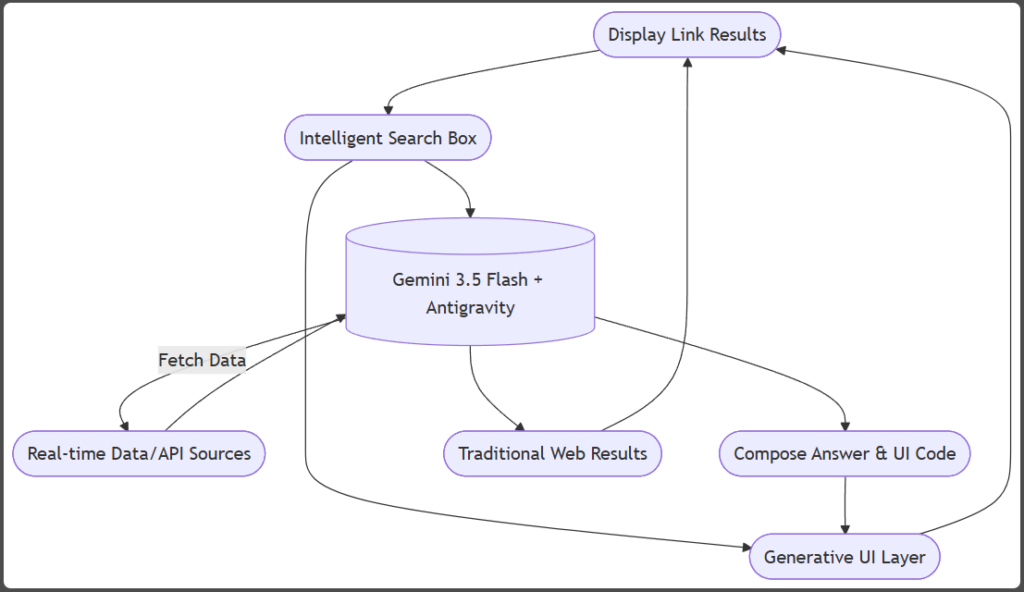
In this flow, the user’s query enters the expanded search box. Google’s AI (Gemini 3.5 + Antigravity) retrieves real-time data (via MCP), then generates code for interactive answers or dashboards. These appear alongside (or instead of) normal links.
Sources: Google’s official I/O announcements and docs; Search Engine Land and TechCrunch analyses; and industry SEO reports. Details not specified by Google (e.g., exact ranking changes, rollout in specific regions) are noted as assumptions.