Google Search Console AI-powered Configuration 2026 – Detailed Analysis
What Is Google Search Console AI-powered Configuration?
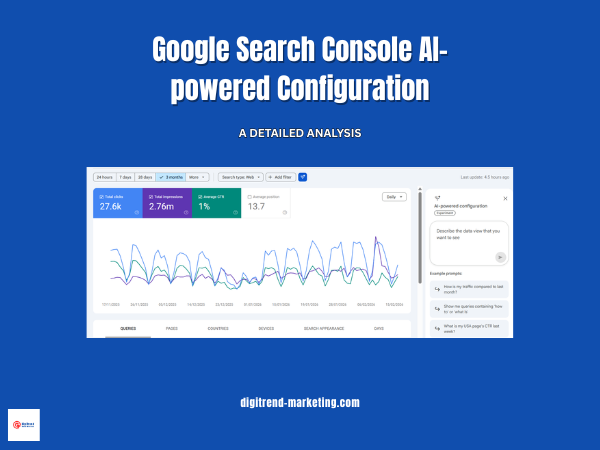
Over two months ago, Google began testing its Google Search Console AI-powered configuration tool, marking an important step forward in how marketers interact with search data. This experimental feature uses artificial intelligence to customize your Performance report (Search) based on the data you request. Instead of manually applying filters, setting up comparisons, and selecting metrics, you can simply ask the assistant to configure the report for you using natural language.
This innovation is part of the broader search console updates 2026, where Google is integrating AI-powered search analytics directly into its core tools. The goal is to reduce manual effort, improve accessibility, and help users uncover insights faster. By turning Search Console into an AI search performance tracker, Google is moving toward a future where data analysis becomes conversational rather than technical.
In this detailed analysis, we will explore how the feature works, its capabilities, limitations, and practical ai-powered configuration queries example use cases for SEO professionals and marketers.
Features of Google Search Console AI-powered Configuration

The Google Search Console AI-powered configuration feature is designed to simplify how users interact with search performance data. Traditionally, configuring reports required multiple manual steps, selecting filters, adjusting date ranges, choosing metrics, and setting comparisons. With AI integration, much of that effort is now automated.
The system understands natural language requests and prepares the report accordingly. This makes AI-powered search analytics more accessible, especially for users who may not be deeply familiar with Search Console’s interface.
Below is a closer look at the core capabilities of the feature.
Applying Filters Automatically
One of the biggest advantages of the AI configuration tool is its ability to narrow down data based on specific criteria without requiring manual setup. Users can filter information using dimensions such as search queries, page URLs, countries, devices, search appearance, or time periods.
Instead of navigating multiple dropdown menus, you can simply describe what you want to analyze. The AI interprets your request and applies the relevant filters instantly. This is particularly useful when working with large datasets, where manual filtering can be time-consuming.
For example, you can ask:
“Show me queries on phone searches that contain the word ‘seo’ in the last 6 months.”
The assistant will automatically configure the report with the correct device filter, keyword condition, and date range.
Configuring Comparisons Without Manual Work
Comparing performance across time periods or page segments is essential for understanding trends, growth, or declines. However, setting up these comparisons manually often involves several steps and can be confusing for newer users.
The AI-powered system simplifies this process by automatically creating comparisons based on your request. Whether you want to compare different months, quarters, or content categories, the assistant handles the configuration.
For example:
“Compare traffic for my pages that contain ‘how’ in this quarter to the same quarter last year.”
With one prompt, the tool applies both the page filter and the time comparison, allowing you to focus directly on the insights instead of the setup.
Selecting Metrics Based on Your Question
Search Console provides four primary performance metrics:
- Clicks
- Impressions
- Average CTR
- Average Position
Choosing the right metrics depends on what you are trying to analyze. The AI assistant removes this guesswork by automatically selecting the most relevant metrics based on your request.
For instance, if your question focuses on engagement or ranking performance, the system may prioritize CTR and position metrics.
Example:
“Show me the Average CTR and Average Position of my queries in Spain in the last 28 days.”
The assistant understands both the geographic filter and the metrics you want to review, configuring everything automatically.
Specific Content Analysis Made Easier
Another useful capability is analyzing performance for particular content themes or page groups. Instead of manually searching for URLs or applying multiple filters, you can request performance data related to specific keywords within your pages.
For example:
“Show clicks for queries that include the word ‘google’.”
This type of request allows you to quickly evaluate how certain topics or content clusters are performing, which can support content strategy and optimization decisions.
Overall, these features transform Search Console into a more intuitive AI search performance tracker, where users spend less time configuring reports and more time understanding insights. The automation of filters, comparisons, and metrics not only saves time but also lowers the barrier for advanced analysis, making the tool more practical for marketers, business owners, and SEO professionals alike.
Limitations of Google Search Console AI-powered Configuration
While the Google Search Console AI-powered configuration feature introduces a more efficient and user-friendly way to analyze search data, it is important to understand its current limitations. Like any experimental AI capability, it is designed to assist with specific tasks rather than replace the entire workflow.
Being aware of these constraints helps users set realistic expectations and avoid potential misinterpretations when using AI-powered search analytics.
Limited Scope of Reports
At the moment, the AI configuration tool works only within the Performance report for standard Search results. It does not support other Search Console reporting areas such as Discover or News performance data.
This means users who rely heavily on Discover traffic insights or Google News visibility will still need to configure those reports manually. As the feature evolves, broader support may be introduced, but currently its functionality remains focused on traditional search performance analysis.
Possible Accuracy Issues in Interpretation
Although the AI assistant is designed to understand natural language requests, it may occasionally misunderstand the intent behind a prompt. This can lead to filters or comparisons being applied differently than expected.
For this reason, users should always review the automatically configured settings before drawing conclusions from the data. Verifying elements such as:
- Date ranges
- Filters applied
- Metrics selected
- Comparison periods
ensures that the analysis aligns with the original objective.
AI can significantly reduce manual effort, but human validation remains essential for accurate decision-making.
Configuration Only, No Additional Actions
Another important limitation is that the feature focuses strictly on configuring reports. It helps set up filters, comparisons, and metrics, but it does not perform additional actions beyond that scope.
For example, users still need to manually:
- Sort tables
- Export data
- Download reports
- Perform advanced data manipulation
This means the AI assistant should be viewed as a configuration accelerator rather than a complete automation tool.
Understanding these limitations allows users to use the AI search performance tracker more effectively while maintaining control over their analysis process. As part of the ongoing search console updates 2026, the feature is likely to evolve, but for now, combining AI assistance with manual verification provides the best results.
Examples of Prompts You Can Use
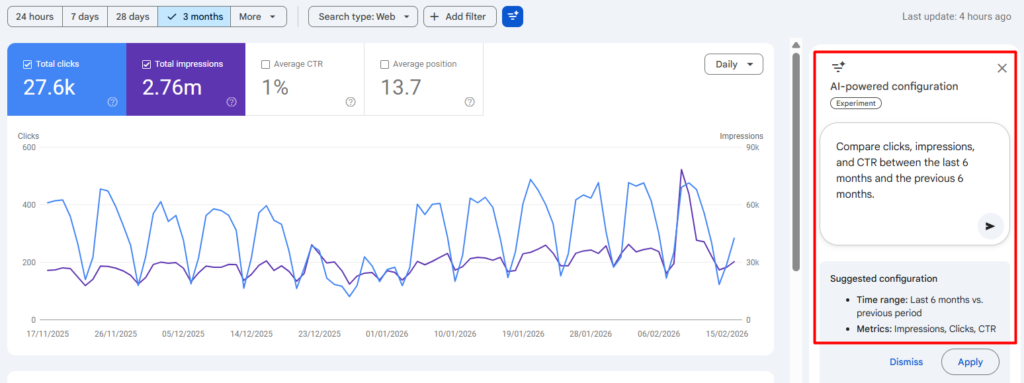
One of the most practical advantages of the Google Search Console AI-powered configuration feature is how naturally you can interact with your data. Instead of navigating multiple filters and settings, you can simply describe what you want to analyze, and the system prepares the report for you.
Below are examples of prompts that demonstrate how users can explore performance insights using AI-powered search analytics. These examples show how both basic and more advanced analysis can be performed quickly with natural language.
Basic Prompts
Basic prompts are useful for routine performance monitoring, reporting, and quick comparisons. They help users understand trends over time without needing to manually configure reports.
- Compare clicks for the last 30 days vs the same period last year for all queries.
- Show lost queries compared to the previous 28 days.
- Compare clicks, impressions, and CTR between the last 6 months and the previous 6 months.
- What are my blog page’s CTR for the last 3 months?
These types of requests are especially helpful for marketers who need regular performance updates or want to track changes over time. By automating the setup process, the feature reduces manual effort and allows users to focus more on interpreting the results.
Advanced Prompts
Advanced prompts enable deeper insights by combining multiple conditions such as keyword patterns, performance changes, and device comparisons. These queries are particularly useful for SEO professionals who want to identify optimization opportunities or performance shifts.
- How queries contain words like “seo”, “social media”, “marketing”, “what” in the last 3 months.
- Show queries where the average position improved in the last month compared to the previous month.
- Show pages where impressions decreased compared to the same period last year.
- Show the CTR difference for the keyword ‘seo’ between desktop and mobile devices.
- Compare this month’s performance of pages in the services category with last month’s.
These examples highlight how the feature functions as an AI search performance tracker, allowing users to analyze ranking improvements, content performance declines, and keyword behavior across different segments without complex setup.
Why Google Search Console AI-powered Configuration Helps
The introduction of Google Search Console AI-powered configuration is not just a convenience upgrade, it fundamentally improves how users interact with search data. By simplifying report setup and making advanced analysis easier to access, the feature delivers practical benefits for marketers, SEO professionals, and business owners alike.
Below are the key reasons why this capability matters within the broader evolution of AI-powered search analytics and the search console updates 2026.
Reduces Analysis Time
One of the most immediate benefits is the reduction in time required to configure reports. Traditionally, users needed to manually select filters, adjust date ranges, and set comparisons before they could even begin analyzing performance.
With natural language prompts, that process becomes much faster. Instead of spending time navigating the interface, users can simply describe what they want to see.
This leads to:
- Faster access to insights
- More efficient workflows
- Quicker decision-making
For professionals who analyze data regularly, even small time savings per report can add up to significant productivity gains over weeks and months.
Makes Advanced Analysis Accessible
Search Console has always been powerful, but not always easy for beginners. Advanced comparisons and segmentation often required experience with the platform.
The AI-powered configuration tool lowers that barrier by allowing non-technical users to perform complex analysis without needing deep knowledge of the interface.
This means:
- Beginners can explore data more confidently
- Marketing teams can collaborate more easily
- Businesses can make better use of their search data
By reducing complexity, the feature makes SEO insights accessible to a wider audience.
Improves Opportunity Discovery
Another major advantage is the ability to identify growth opportunities more quickly. When report configuration becomes easier, users can explore more data scenarios and uncover insights that might otherwise be missed.
For example, the feature makes it easier to identify:
- High-impression keywords with low click-through rates
- Queries that are close to ranking improvements
- Content gaps where new topics could attract traffic
These insights can directly lead to actions that improve visibility and increase organic traffic.
Enables Better Segmentation
Segmentation is critical for understanding search performance because overall averages often hide important patterns.
The AI assistant allows users to quickly analyze performance across different dimensions such as:
- Device type
- Geographic location
- Page categories
- Query intent patterns
Better segmentation leads to more accurate insights, which in turn support more strategic optimization decisions.
Supports Strategic Planning
Beyond day-to-day analysis, the AI search performance tracker also helps with long-term planning. By making it easier to compare time periods and analyze trends, users can detect patterns such as:
- Seasonal performance changes
- Traffic growth or decline trends
- Shifts in search demand
- Performance fluctuations over time
These insights are valuable for forecasting, campaign planning, and content strategy development.
Final Thoughts
At DigiTrend Marketing Solutions, we see the launch of Google Search Console AI-powered configuration as more than just another feature update, it’s a clear signal of where the future of marketing analytics is heading.
Search Console is no longer just a place to check numbers. It’s evolving into a smart assistant that helps marketers understand performance faster and with less effort. When data becomes easier to access and interpret, businesses can move from reactive decisions to proactive strategy.
For SEO professionals and marketing teams, this shift brings meaningful advantages:
- Faster workflows with less manual setup
- Smarter decisions based on quicker insights
- More time to focus on strategy instead of configuration
- A stronger competitive edge in organic search
The reality is simple: the companies that learn to use AI-driven tools early will gain momentum faster than those that wait. Conversational analytics, where you ask questions and tools deliver insights, is likely to become the standard across marketing platforms in the coming years.
If you want to understand the broader impact of AI on marketing and SEO, you can explore our detailed insights here:
- https://digitrend-marketing.com/how-artificial-intelligence-in-digital-marketing-impacting-in-2026/
- https://digitrend-marketing.com/the-future-of-seo-how-ai-is-changing-search-engine-optimization/
As AI continues to reshape digital marketing, the goal remains the same: better insights, better decisions, and better growth. Tools like this simply make that journey faster and more accessible for everyone.