
DigiTrend SERP Location Changer
A Free Location Changer Extension For Google Chrome

Geo Location Changer Extension
The DigiTrend SERP Location Changer is a free Chrome extension that helps SEO professionals, digital marketers, agencies, local businesses, and website owners view Google Search results from virtually any location in the world.
Instead of relying on VPNs, proxy tools, or manual search parameter changes, our free SERP location changer allows you to simulate local search results directly within Google Search. Whether you’re tracking rankings in Denver, London, Mumbai, Sydney, or any other city, you can quickly switch locations and see how Google’s search results appear to users in that area.
If you’re performing local SEO audits, competitor analysis, map pack research, or multi-location SEO campaigns, DigiTrend provides a simple and reliable solution.
Why Use DigiTrend SERP Location Changer?
Google personalizes search results based on a user’s location. This means that two people searching the same keyword in different cities can see completely different results.
The DigiTrend Google Search location changer allows you to:
1. View localized Google search results
2. Analyze local SEO performance
3. Monitor keyword rankings in target cities
4. Research competitors in different markets
5. Test location-specific search intent
6. Verify Google Business Profile visibility
7. Check Local Pack rankings
8. Support international SEO campaigns
Unlike many tools that require paid subscriptions, DigiTrend offers a lightweight and efficient online location changer directly within your browser.

Key Features of Our Location Changer
Enter a city, state, country, or full address and instantly switch your Google search location.
Analyze search results from thousands of locations across the globe.
Access commonly searched locations with one click using built-in presets.
Adjust Google country settings (gl) and language settings (hl) to replicate local search environments more accurately.
Perfect for agencies, consultants, and in-house SEO teams managing multiple markets.
No subscriptions. No complicated setup. Simply install the extension and start analyzing localized SERPs.
How to Use the DigiTrend SERP Location Changer
Getting started takes less than a minute.
Step 1: Open the Extension
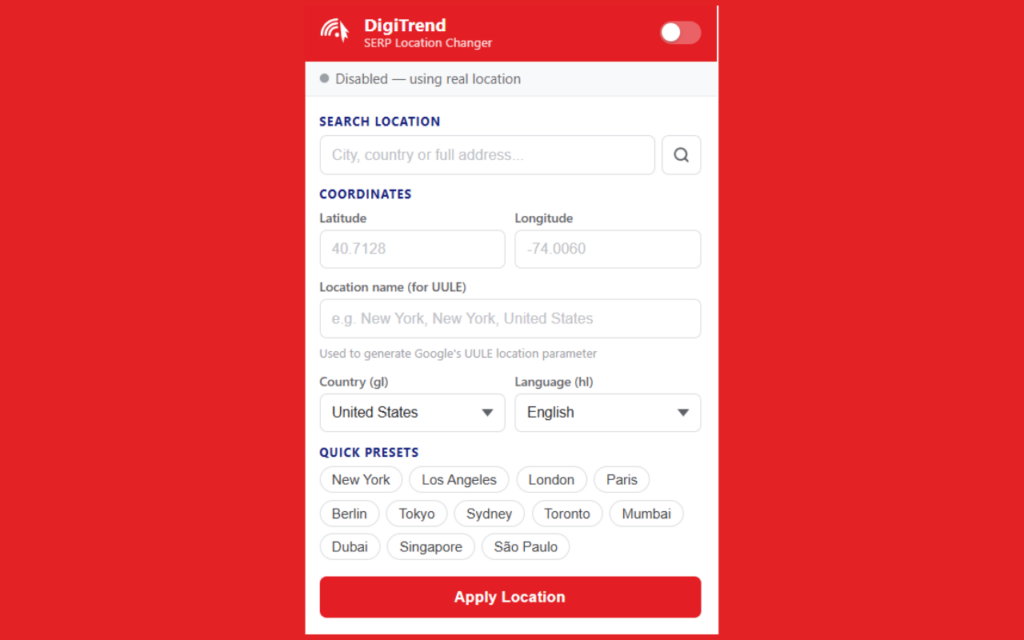
Click the DigiTrend SERP Location Changer icon in your Chrome toolbar.
The extension panel will open, allowing you to configure your desired search location.
Screenshot 1: Extension Dashboard
Features available:
- Search location field
- Latitude and longitude coordinates
- Country selection
- Language selection
- Quick location presets
- Location activation toggle
Step 2: Search for a Location
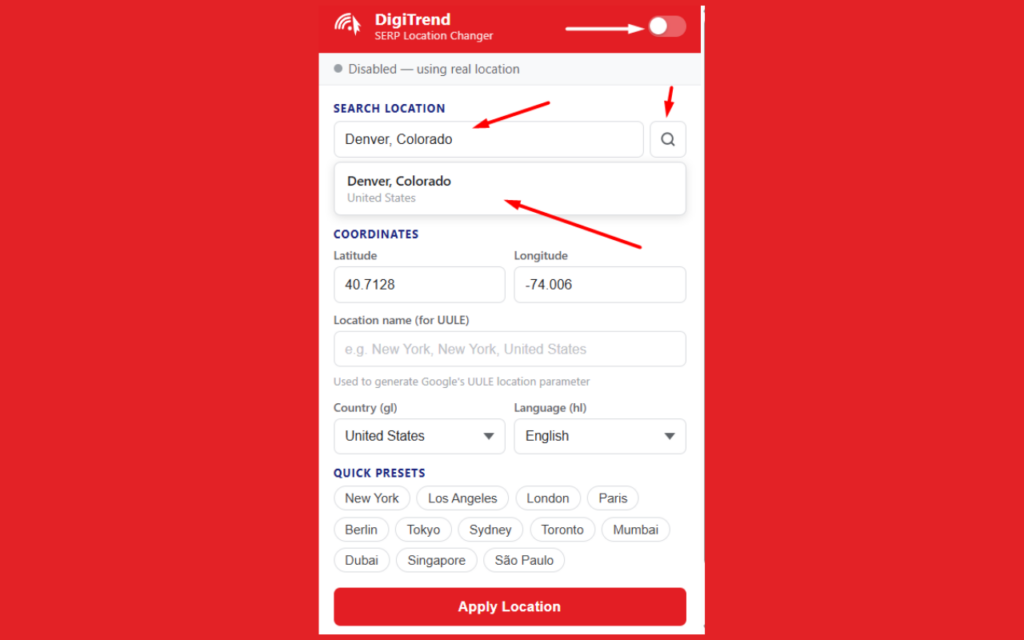
Enter the city, region, or address you want to simulate.
For example:
- Denver, Colorado
- New York, New York
- London, United Kingdom
- Sydney, Australia
Click the search icon and select the suggested location.
Screenshot 2: Selecting a Target Location
The extension automatically retrieves:
- Location name
- Geographic coordinates
- Country settings
- Search parameters required for accurate localization
Step 3: Apply the Location
Once the desired location has been selected:
- Turn the extension ON.
- Click Apply Location.
- Open Google Search and perform your search.
The extension will automatically apply location-specific parameters to Google searches.
Step 4: Verify Localized Results
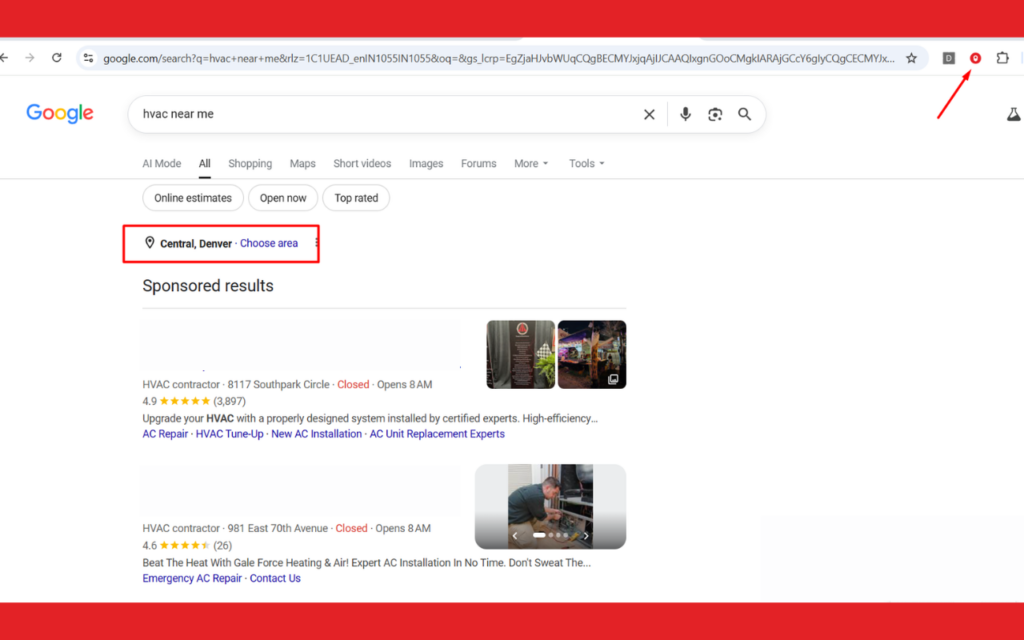
When searching on Google, you’ll see the selected location reflected within the search results.
For example, a search for “HVAC near me” may show:
Central, Denver
instead of your actual location.
Screenshot 3: Localized Google Search Results
This allows you to verify:
- Local rankings
- Google Maps visibility
- Local Pack results
- Organic search positions
- Competitor presence in specific markets
Who Is This Extension For?
SEO Professionals
Track local rankings and perform more accurate SERP analysis across multiple cities.
Digital Marketing Agencies
Manage client campaigns in different service areas without needing separate devices or VPNs.
Local Businesses
Understand how customers in different locations see your business in Google Search.
Franchise & Multi-Location Brands
Monitor search visibility across multiple markets from a single browser.
International SEO Teams
Research location-specific search behavior and localized search results worldwide.

Install the Free SERP Location Changer Today
Stop guessing how Google Search looks in different cities.
Install the DigiTrend Free SERP Location Changer and instantly view localized search results from anywhere in the world. Whether you’re an SEO consultant, agency owner, local business, or marketing professional, this Google Search location changer helps you make better SEO decisions with location-specific search data.
Start using the DigiTrend free SERP location changer today and gain a clearer view of how your audience experiences Google Search.
FAQs
DigiTrend SERP Location Changer is a free Chrome extension that allows users to view Google Search results from different geographic locations worldwide.
Yes. The extension is completely free to use.
SEO professionals, agencies, local businesses, marketers, and website owners can use the extension to analyze localized search results.
Yes. The extension supports location-based searches from cities and countries worldwide.