Google Ads API Version 26 Released: New Features, Breaking Changes, and What Advertisers Need to Know
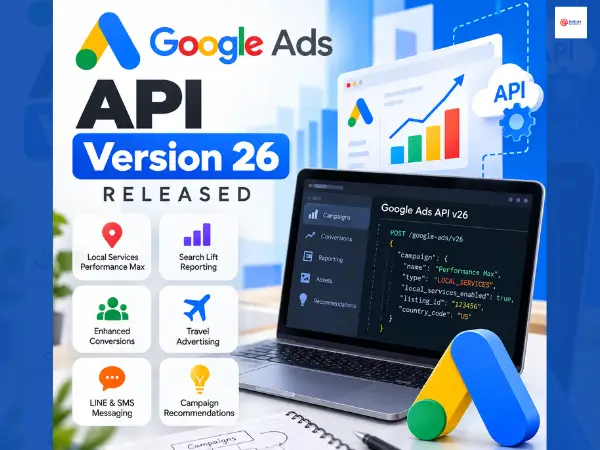
Google Ads API version 26 was released on October 14, 2026, and included new features relating to campaign management, conversion tracking, travel advertising, reporting, and Local Services Performance Max campaigns.
This update also affects the way in which developers set up various campaigns and access their Enhanced Conversions settings. For any team that uses the Google Ads API to manage accounts, automate the creation of campaigns, or to build reporting tools, these changes should be examined in more detail before upgrading.
Google has likewise decided to adopt a more rapid release schedule, bringing out two API versions each month beginning with version 26. As a result, development teams will now have to examine API updates more frequently than they did before.
DigiTrend provides a detailed examination of Google Ads API v26, covering its key features, breaking changes, technical requirements, and the practical effects this will have on advertisers and developers.
What Is Google Ads API Version 26?
The Google Ads API allows developers to programmatically manage Google Ads accounts. It supports tasks such as creating campaigns, managing ad groups, updating budgets, retrieving performance data, configuring conversion tracking, and automating reporting.
Version 26 is a major API release. It introduces new functionality, changes certain existing fields, and removes some older fields that applications may still use.
According to Google’s official release notes, v26 was released on October 14, 2026. Developers can review the complete list of changes in the Google Ads API release notes.
The update covers several areas:
- Local Services Performance Max campaign creation
- Search Lift measurement and reporting
- Enhanced Conversions configuration
- Travel and hotel advertising controls
- LINE and SMS business messaging assets
- Shopping and Demand Gen campaigns
- EU political advertising declarations
- YouTube generative content disclosures
- Campaign recommendations and conversion reporting
Not every change affects every advertiser. The impact depends on the API features, campaign types, and reporting workflows an application uses.
Key Features in Google Ads API v26
1. Local Services Performance Max Campaign Creation
Google Ads API v26 expands support for creating Local Services Performance Max campaigns through external API clients.
Previously, the PmaxCampaignSettings.local_services_enabled field was output-only. Version 26 changes it to immutable, allowing API clients to set local_services_enabled = true when creating a new Performance Max campaign.
The release also introduces LocalServicesPmaxCampaignSettings.listing_id, which is required during Local Services Performance Max campaign creation. Developers must also provide the required country_code field.
Google has added validation errors related to campaign eligibility, account agreements, listing IDs, and campaign goals.
What this means for developers: Applications that create Local Services Performance Max campaigns need to include the required listing and country information and account for the new validation rules. Existing campaign creation workflows may need code changes before they can use this functionality.
This update is especially relevant to developers building tools for local service businesses, agencies managing multiple advertiser accounts, and platforms that automate campaign setup.
2. Unified Enhanced Conversions Configuration
Version 26 changes how applications retrieve the account-level Enhanced Conversions configuration.
Google has introduced two fields on ConversionTrackingSetting:
- enablement_setting
- effective_enablement_setting
Both are available through Customer.conversion_tracking_setting.
The release also removes the older enhanced_conversions_for_leads_enabled field from the API.
Developers should use enablement_setting to inspect the account-level Enhanced Conversions setting instead of relying on the removed field.
Why this matters: Applications that read conversion tracking settings may fail to compile or return errors if they still reference the removed field. Updating the relevant code and validating conversion settings after migration can help prevent reporting and account-management issues.
The new configuration also gives developers access to the unified Enhanced Conversions setting, rather than relying on the previous field for Enhanced Conversions for Leads.
3. Search Lift Measurement and Reporting
Google Ads API v26 adds support for Search Lift measurement, giving developers new resources and reporting metrics for analyzing the effect of advertising on search behavior.
The release introduces the read-only SearchLiftKeywordBundle resource, which represents a keyword bundle used in a Search Lift study.
It also adds two report segments:
- segments.search_lift_keyword_bundle
- segments.search_property
Google has added 15 Search Lift metrics, including:
- relative_search_lift
- normalized_incremental_searches
- search_lift_cost_micros
- search_lift_impressions
These metrics work with LiftMeasurementConfig, which can be linked to campaigns through Campaign.lift_measurement_config.
What this means for advertisers: Search Lift reporting can help teams examine changes in search behavior associated with advertising campaigns. It provides additional measurement options beyond standard performance metrics such as clicks, impressions, and conversions.
However, Search Lift metrics should not be treated as interchangeable with ordinary conversion reporting. Developers need to understand the study configuration, available dimensions, and metric definitions before using them in performance dashboards.
4. Travel Bid Modifiers Are No Longer Limited to Hotels
Version 26 replaces several hotel-specific targeting fields in AdGroupBidModifier with more general travel-related fields.
The new fields include:
- user_set_dates
- advance_booking_window
- length_of_booking
- start_day_of_week
- start_date_range
These fields replace older hotel-specific criteria covering date selection, advance booking windows, length of stay, check-in days, and check-in date ranges.
Google has also renamed HotelDateSelectionType to DateSelectionType and updated related error codes.
The new fields support targeting across travel advertising categories beyond hotels, including Things to do ads.
Why this matters: Developers building travel advertising integrations should update their field references and error-handling logic. Existing values for minimum and maximum nights carry over to the corresponding minimum and maximum booking days.
Google states that the targeting behavior, criterion IDs, and existing bid modifiers remain the same. The main change is the broader terminology and support for additional travel categories.
5. LINE and SMS Business Messaging Assets
Google Ads API v26 adds support for LINE and SMS as business message providers.
The release introduces:
- BusinessMessageAsset.line_info
- BusinessMessageAsset.sms_info
- BusinessMessageProvider.LINE
- BusinessMessageProvider.SMS
These additions allow API clients to work with the corresponding messaging asset types.
What this means for developers: Advertising management platforms that handle business messaging assets can update their integrations to recognize LINE and SMS providers. The actual availability of these options depends on the relevant Google Ads product features and eligibility requirements.
This is an API-level addition; it should not be interpreted as confirmation that every advertiser can immediately use every messaging option in every campaign.
6. Demand Gen Minimum Daily Budget Information
Google Ads API v26 adds demand_gen_info.minimum_budget_per_day_micros to CurrencyConstant.
This field returns the minimum daily budget required for a Demand Gen campaign in a specific currency. Google notes that the value updates when the minimum budget enforced by the API changes.
Why this matters: Developers can use the field to check the applicable minimum budget before creating or managing a Demand Gen campaign. This can reduce avoidable campaign creation errors caused by budget requirements.
The field also makes it easier for advertising platforms to display currency-specific budget requirements instead of relying on hardcoded values that may become outdated.
7. Shopping Campaign Enhancements
Version 26 expands support for Campaign.listing_type to Shopping campaigns.
The release also extends final_url_expansion_asset_view to support Shopping campaigns. In this view, ad_group is selectable as an attributed resource.
These changes provide additional options for applications that manage Shopping campaign listings and report on final URL expansion assets.
For developers, the main task is to review existing campaign and reporting queries to determine whether the new fields and resource combinations are relevant to their workflows.
8. Improved EU Political Advertising Declarations
Google has updated the rules for the Campaign.contains_eu_political_advertising field.
Under the new rules, this declaration is optional for certain campaigns that target locations outside the European Union and meet specific targeting conditions.
For eligible campaigns, the conditions include:
- No positive location targeting inside the EU.
- No positive proximity or location group targeting.
- At least one positively targeted location outside the EU.
For Demand Gen campaigns using upgraded targeting, the conditions apply to every active ad group in the campaign.
Google has also introduced GeoTargetConstant.require_eu_political_advertising_declaration and corresponding fields on campaign and ad group criteria. These fields help identify targeting criteria that require a declaration.
The rules also apply to existing campaigns. Campaigns that do not satisfy the applicable conditions may still require the declaration, and requests that fail validation can return an error.
What advertisers should know: This change can reduce the need to submit the declaration for certain eligible campaigns, but it does not remove EU political advertising requirements across the board. Developers should evaluate the actual targeting configuration rather than automatically omitting the field.
9. New Local Services Lead Data
Google Ads API v26 adds the campaign field to the LocalServicesLead resource, linking a Local Services lead to its associated campaign.
Google has also added COUPON to the LocalServicesLeadType enumeration.
These additions give developers more information to work with when retrieving and organizing Local Services lead records.
For agencies and reporting platforms, the campaign association can help connect lead records to campaign-level reporting. The new coupon lead type also allows applications to recognize that category rather than treating it as an unknown or unsupported value.
10. New Search Campaign Budget Recommendations
The release adds a recommendation type called RAISE_BUDGET_PERFORMANCE_TOO_LOW.
Google has also introduced the associated recommendation resource and an operation for applying the recommendation:
- Recommendation.raise_budget_performance_too_low_recommendation
- ApplyRecommendationOperation.raise_budget_performance_too_low
This feature supports recommendations to raise budgets when Search campaigns have budgets that are too low.
For developers, the update creates another option for retrieving and applying budget recommendations through the API. Applications should still present recommendations in the context of the advertiser’s goals, budget limits, and campaign performance rather than assuming that every recommendation should be applied automatically.
11. Additional Conversion Tracking Updates
Beyond the changes to Enhanced Conversions configuration, v26 introduces two other conversion-related updates.
Message lead conversion category
Google adds ConversionActionCategory.MESSAGE_LEAD to support message or chat interactions that indicate interest in an advertiser’s offering.
This gives developers a specific category for supported messaging-related lead actions.
Click attribution event type
The new ConversionAttributionEventType.CLICK value represents conversions attributed to an ad click. These conversions were previously included under the UNKNOWN enum value.
Applications that process conversion attribution events should review their logic to recognize the new value correctly.
These changes are relevant to reporting systems, conversion integrations, and tools that categorize leads by source or interaction type.
12. YouTube Generative Content Disclosures
Version 26 adds support for generative content disclosures in YouTube uploads through the API.
The new YouTubeVideoUpload.video_content_metadata field uses the VideoContentMetadata type. It includes disclosure settings through VideoContentMetadata.generative_content_disclosure, which uses the YouTubeVideoUploadGenerativeContentDisclosure type.
This allows supported API workflows to work with generative content disclosure settings when uploading YouTube videos.
Developers building video publishing tools should review the new fields and determine whether their upload workflows need to collect or transmit these settings.
13. New Hotel Center Account Validation
Google has added the error HOTEL_PROPERTY_ASSET_SET_HOTEL_CENTER_LINK_REQUIRED.
This error indicates that linking a hotel property asset set to a Performance Max for travel goals campaign requires an active Hotel Center account link.
Applications that create or modify these campaigns should check the account-linking requirements and handle the new error appropriately.
This is a validation change, not a general announcement that every Performance Max campaign requires a Hotel Center account.
Breaking Changes in Google Ads API v26
A major API release can require code changes even when the new features are not part of an application’s main workflow.
The following table summarizes the changes that developers should review before upgrading.
| Area | What changed | Recommended action |
| Local Services Performance Max | country_code and listing_id are required for campaign creation | Update campaign creation requests and validate listing IDs |
| Enhanced Conversions | enhanced_conversions_for_leads_enabled was removed | Use enablement_setting to inspect the account-level setting |
| Travel targeting | Hotel-specific bid modifier fields were replaced by more general fields | Update field names, types, and error handling |
| Travel date selection | HotelDateSelectionType became DateSelectionType | Update code references and type handling |
| Travel targeting errors | Several hotel-specific errors were renamed | Update error mappings and tests |
Source: Official Google Ads API v26 release notes.
How These Changes Could Affect Existing Integrations
The impact depends on which API resources an application uses.
For example, an application that only retrieves basic Search campaign metrics may need fewer changes than a platform that creates Local Services Performance Max campaigns, manages travel bid modifiers, and reads Enhanced Conversions settings.
Developers should check for removed fields, renamed types, newly required request parameters, and new enum values. Applications that assume every unknown enum value is an error or map unfamiliar values to generic categories may also need updates.
A successful API connection does not guarantee that every operation will work as expected after migration. Testing should cover the specific requests, responses, and reporting queries used in production.
Google Ads API Release Schedule Is Changing
Google announced a change to the API release cadence on October 12, 2026. Starting with v26, the Google Ads API is moving to two releases per month.
Google also says its release blog posts and YouTube live events will move to twice a quarter, covering important updates across several releases at a time.
This means developers may see new API versions more frequently, even if they do not receive a separate blog post for every release.
Google recommends following the official release notes to receive notifications when they change.
For engineering teams, the practical response is to make API release review part of the regular maintenance cycle. That does not necessarily mean upgrading every application immediately after every release. Teams should evaluate the changes, assess compatibility, and plan upgrades based on their dependencies and release requirements.
You can follow the announcements through the Google Ads Developer Blog.
How to Upgrade to Google Ads API v26
Upgrading to a new major API version requires more than changing the version number in a request. Developers should review the updated client libraries, identify incompatible fields, and test the operations their applications depend on.
Here is a practical migration checklist.
Step 1: Review the Official Upgrade Guide
Start with Google’s Upgrade to the Latest Version guide. It documents the changes between API versions and provides the information needed to update existing integrations.
Pay particular attention to removed fields, renamed types, and changes to required campaign creation parameters.
Step 2: Update Your Client Library
Google has published updated client libraries and code examples for v26.
Download the appropriate library for your programming language and review its version-specific requirements. Update your dependencies and resolve any compilation errors caused by removed or renamed API elements.
Step 3: Search Your Codebase for Deprecated References
Review your code for references to:
- enhanced_conversions_for_leads_enabled
- Hotel-specific AdGroupBidModifier fields
- HotelDateSelectionType
- Hotel-specific targeting error codes
Also check whether your application creates Local Services Performance Max campaigns. If it does, confirm that the required country_code and listing_id fields are supplied.
Step 4: Update Reporting and Enum Handling
Review reporting queries that use Search Lift metrics, Shopping campaign resources, or travel-related segments.
Update conversion processing to recognize MESSAGE_LEAD and the new CLICK attribution event type. Review Local Services lead processing to support the new campaign association and coupon lead type.
Step 5: Test Before Production Deployment
Use a development or test environment to validate the operations your application performs.
Test campaign creation, conversion setting retrieval, report generation, and error handling where applicable. Check that the application handles both successful responses and validation failures correctly.
After deployment, monitor API errors and compare important reports against the expected output.
Who Should Pay Attention to This Release?
Not every Google Ads user needs to make technical changes. The following groups are most likely to be affected.
| User or team | What to review |
| Google Ads API developers | Client library compatibility and breaking changes |
| PPC automation platforms | Campaign creation, budget recommendations, and conversion settings |
| Local SEO and paid media agencies | Local Services Performance Max support and lead reporting |
| Travel and hotel advertisers | Updated booking criteria, bid modifiers, and account validation |
| Analytics and reporting teams | Search Lift metrics, attribution events, and new report segments |
| Video publishing platform developers | YouTube generative content disclosure settings |
| Demand Gen campaign managers using API tools | Currency-specific minimum daily budget information |
If you manage Google Ads campaigns directly through the standard Google Ads interface and do not use API-based tools or integrations, this release does not automatically require you to change your campaign settings.
How Long Will Google Ads API v26 Be Supported?
Google’s published release schedule lists November 2027 as the projected sunset for v26. This is a scheduled lifecycle date, not a guarantee that every integration will remain compatible until then without maintenance.
Google also lists v26.1 as an optional minor release projected for November 2026, with a November 2027 sunset. The published schedule is subject to change.
For the latest version lifecycle information, consult Google’s API deprecation and sunset dates.
Developers should plan around the official dates rather than assuming a major API version will remain available indefinitely.
What Does Google Ads API v26 Mean for the Future of PPC Automation?
Version 26 adds capabilities that can improve how software manages campaigns and measures advertising activity. Search Lift reporting provides additional ways to study search behavior, Local Services Performance Max gains API-based campaign creation support, and the updated conversion settings give developers a new way to inspect Enhanced Conversions configuration.
The release also shows why API maintenance matters. New capabilities often arrive alongside changes to existing fields, types, and validation rules. An application can miss out on useful functionality or encounter errors if its code remains tied to older API structures.
The move to two releases per month adds another consideration: development teams need a regular process for reviewing release notes, assessing the effect of changes, and deciding when to upgrade.
For advertisers, the main takeaway is that Google Ads API v26 expands campaign automation and measurement options, but the benefits depend on how quickly and correctly developers adapt their integrations.
Frequently Asked Questions
When was Google Ads API v26 released?
Google Ads API v26 was released on October 14, 2026, according to Google’s official release notes.
What are the biggest changes in Google Ads API v26?
Major updates include Local Services Performance Max campaign creation, Search Lift measurement, unified Enhanced Conversions settings, generalized travel bid modifiers, LINE and SMS messaging assets, and Demand Gen minimum daily budget information.
Is Google Ads API v26 a breaking release?
Yes. Version 26 is a major release that includes breaking changes. Developers should review the removal of enhanced_conversions_for_leads_enabled, updated travel targeting fields, and the new required fields for Local Services Performance Max campaign creation.
Do Google Ads advertisers need to upgrade manually?
Advertisers who use API-based applications may need their software or integration updated to use v26. Those who manage campaigns exclusively through the standard Google Ads interface do not automatically need to perform an API migration themselves.
How often will Google Ads API versions be released?
Starting with v26, Google plans to release two API versions per month. Google has also changed its release blog and YouTube event cadence to twice a quarter.
Where can developers find the complete v26 changelog?
Developers can review the official Google Ads API release notes and the API upgrade guide.
Editorial note: API features, field names, and compatibility details in this article are based on Google’s published v26 documentation available as of October 15, 2026. Developers should consult the official documentation before making production changes.